Exploring `irb`
Start clean
I created an alias irb=irb --sample-book-mode
This removes the complex prompt like irb(main):001:0> and gives plain and simple >> instead.
Get Help!
When programming in Python, even today I use dir in Python REPL.
So I was looking for the equivalent in Ruby land.
Turns out I was comparing apples and oranges (so to speak)
As of early 2022, irb has awesome help built-in.
It has good autocompletion. So just typing . may be enough to know list of methods available.
Or just help followed by say String (or Array) is enough.
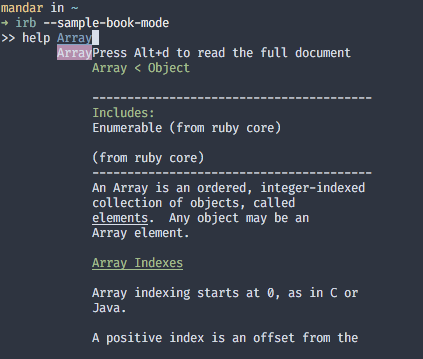
Remove the clutter
During the initial exploration, irb session quickly gets cluttered.
I instinctively tried clear (as used in shell) - that didn’t work 😄
To clear the irb session, use Ctrl+L
You require this
passing -r to irb automatically makes that gem available in irb session.
➜ irb -rpp
>> pp $LOAD_PATH
[".../lib/ruby/site_ruby/1.9.1",
 ".../lib/ruby/site_ruby",
 ".../lib/ruby/vendor_ruby/1.9.1",
 ".../lib/ruby/vendor_ruby",
 ".../lib/ruby/1.9.1",
 "."]
(☝ example may be old. In my case, $LOAD_PATH️ was automatically pretty-printed 😄)
Time to go
Ctrl+D works for both python REPL and irb
In python you require () to call a function
➜ python
Python 3.8.12 (default, Sep 16 2021, 22:00:28)
[Clang 12.0.0 (clang-1200.0.32.29)] on darwin
Type "help", "copyright", "credits" or "license" for more information.
>>> exit
Use exit() or Ctrl-D (i.e. EOF) to exit
In Ruby, it is optional. So both exit() or simply exit works! 👍